Fast. Automated. Shifts.
Next week’s schedule in one click.
Every shift filled with someone available and trained. If it can’t fill one, it tells you why.
14 days free. No card needed.
Week of Oct 6
Sample week
| Team | Mon 6 | Tue 7 | Wed 8 | Thu 9 | Fri 10 | Sat 11 | Sun 12 | Hours |
|---|---|---|---|---|---|---|---|---|
| MarcoCook | 10 AM–6 PM | 10 AM–6 PM | 10 AM–6 PM | 3 PM–11 PM | Time off | 10 AM–6 PM | max 40 | |
| DanaCook | 3 PM–11 PM | 10 AM–6 PM | 10 AM–6 PM | 10 AM–6 PM | max 32 | |||
| PriyaServer | 11 AM–7 PM | 11 AM–7 PM | 11 AM–7 PM | 4 PM–11 PM | 11 AM–7 PM | |||
| JonahServer | 4 PM–11 PM | 4 PM–11 PM | 4 PM–11 PM | 11 AM–7 PM | 4 PM–11 PM | |||
| AikoCashier | 9 AM–3 PM | 9 AM–3 PM | 9 AM–3 PM | 9 AM–3 PM | 9 AM–3 PM | |||
| LuisCashier | Unavailable | Unavailable | 3 PM–9 PM | 3 PM–9 PM | 3 PM–9 PM | 9 AM–3 PM | ||
| SamDishwasher | 5 PM–11 PM | 5 PM–11 PM | 5 PM–11 PM | 5 PM–11 PM | 5 PM–11 PM | |||
| OpenAnyone qualified |
Hatched cells are time off and unavailability your team entered themselves.
After you publish, the week mostly runs itself.
Your team sees their shifts, trades them, and asks for time off from their own phones. You only hear about the parts that need a decision.
Mon 9:02 AM
You publish the week.
Everyone gets a push notification and an email with their own shifts.
Wed 4:10 PM
Jonah can’t make Saturday and offers the shift to the team.
It shows up in the app for the rest of the team to claim.
Wed 4:31 PM
Priya picks it up.
Open offers don’t need your sign-off. You just see the schedule update.
Thu 8:47 AMNeeds you
Luis asks to trade Sunday with Aiko.
A direct swap waits in your Requests inbox for one tap.
Fri 1:15 PMNeeds you
Aiko asks for the 23rd off.
Once you approve it, Auto-Generate won’t schedule Aiko that day.
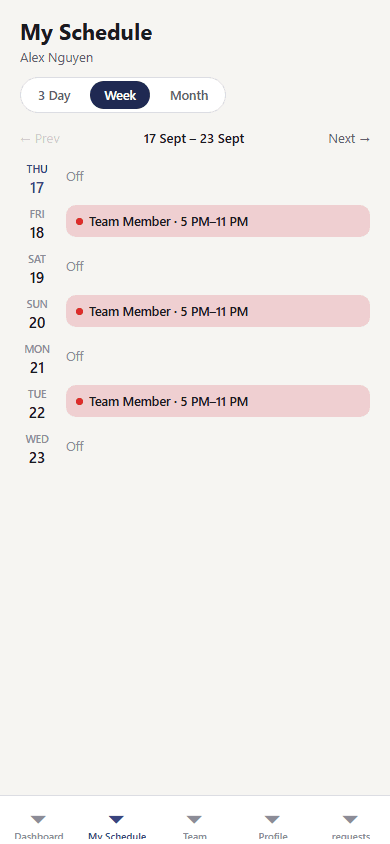
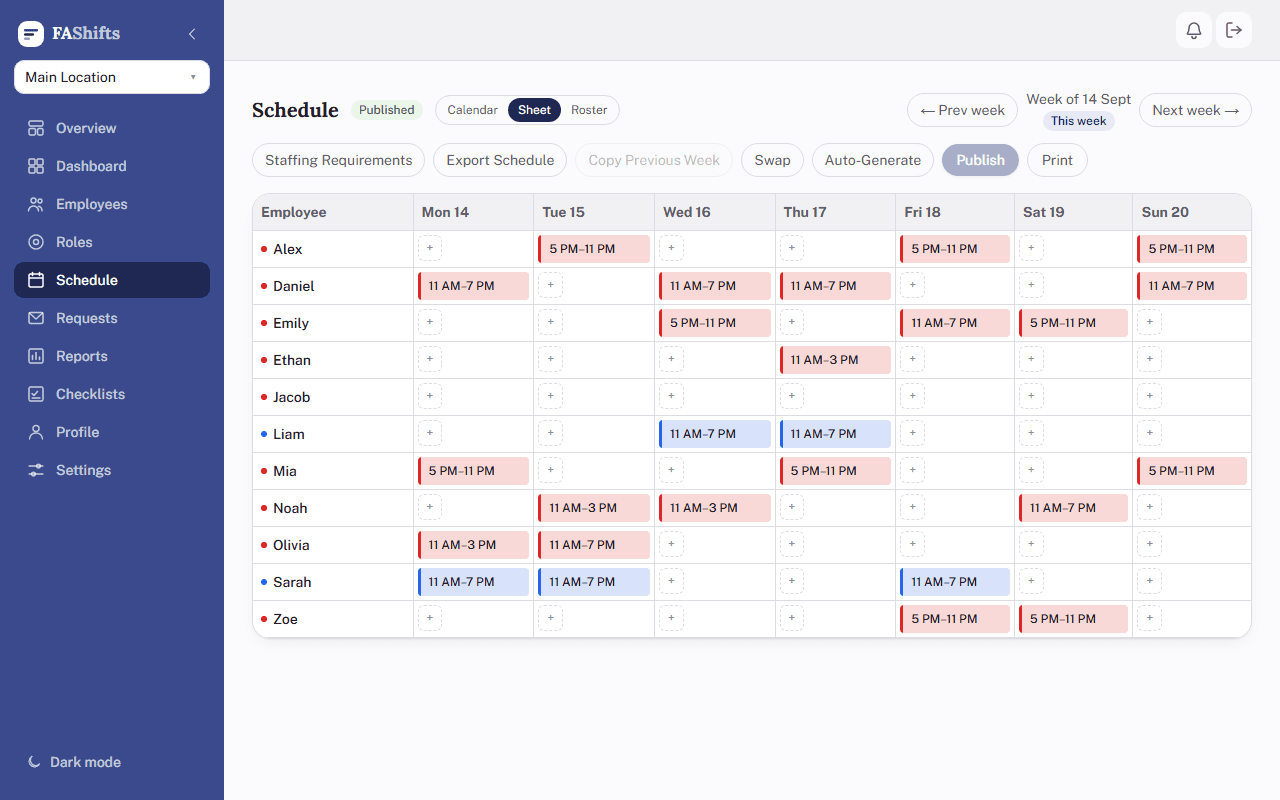
One schedule, three ways to read it.
These are the actual screens, from a demo restaurant account.
The details you’d otherwise handle by hand.
- Set up from your industry
- Pick restaurant, retail, or warehouse and your roles and a starting staffing pattern are filled in from your opening hours.
- Closing time isn’t quitting time
- Set 15 minutes to 2 hours of clean-up after close, and every closing shift runs that much longer.
- Conflicts are flagged, never blocked
- Double-booked, not trained for the role, or over their hours: the shift gets a warning, and you still decide.
- Start from last week
- Copy the previous week into a new one, then change what’s different.
- Labor cost while you build
- Estimated wages update with every shift you place, before payroll ever sees it.
- Print for the wall
- A print layout that fits a full crew on one page, for the back room corkboard.
- Opening and closing checklists
- Your lists, ticked off on each person’s phone during their shift.
- Premium and Enterprise
- Shipments and shift checklists
- Delivery days on everyone’s schedule, with a checklist that follows a late truck. See who signed for what.
- Enterprise
- More than one location
- Each keeps its own roles, hours, and schedule. Owners get one view across all of them.
- Premium and Enterprise
You pay for the people on the schedule. That’s it.
Every account starts with 14 days of Enterprise, no card needed. All plans include Auto-Generate, all three schedule views, swaps and open shifts, notifications, labor estimates, printing, and the iOS and Android app. One flat price every 30 days, set by the size of your team, so hiring or losing someone doesn't change your bill.
One flat price for your whole team, in Canadian dollars. You and your managers aren’t counted. More than 50 people? Talk to us.
BasicFits your team
$15/ 30 days
Up to 10 employees
- 1 location
- 1 manager besides you
- 3 months of history
Premium
$35/ 30 days
Up to 25 employees
- 2 locations
- 5 managers besides you
- 12 months of history
- Reports, CSV and payroll-hours export
- Excel schedule export
- Opening and closing checklists
Enterprise
$65/ 30 days
Up to 50 employees
- 3 locations
- Unlimited managers
- Full report history
- Reports, CSV and payroll-hours export
- Excel schedule export
- Opening and closing checklists
- Combined reports across locations
- Shipment days and per-shift checklists, with who did what
Questions owners ask first.
Does Auto-Generate publish anything on its own?
No. It fills a draft. Nothing reaches your team until you press Publish, and you can drag, edit, or delete any shift before then.
How do employees get their accounts?
You invite them by email from the Employees page. They set a password, enter their availability once, and they’re in. Nobody can join your business without an invite.
Do they have to install an app?
No. Everything works in a phone’s browser. The iOS and Android app is there for anyone who’d rather have it on their home screen and get push notifications.
What happens when the free trial ends?
You pick a plan and check out through Stripe. Everything you set up during the trial stays. If you choose a plan below Enterprise, the features outside it switch off.
Can I change plans or cancel?
Yes, any time. Plans are switched from Settings, and invoices and cancellation are handled in the Stripe billing portal linked from the same page.